The IQ Option Chop Zone Method, Explained Honestly
The word "secret" gets attached to a lot of trading methods, but there is nothing hidden here and no indicator is a secret shortcut. The Chop Zone is simply a market-condition filter. Its one job is to tell you whether price is trending or chopping (moving sideways in a range). That distinction matters because most trend-following setups fall apart the moment the market stops trending. Used on IQ Option, the Chop Zone does not tell you to go up or down. It tells you when a directional signal is worth trusting and when you are better off standing aside.
What the Chop Zone Indicator Actually Measures
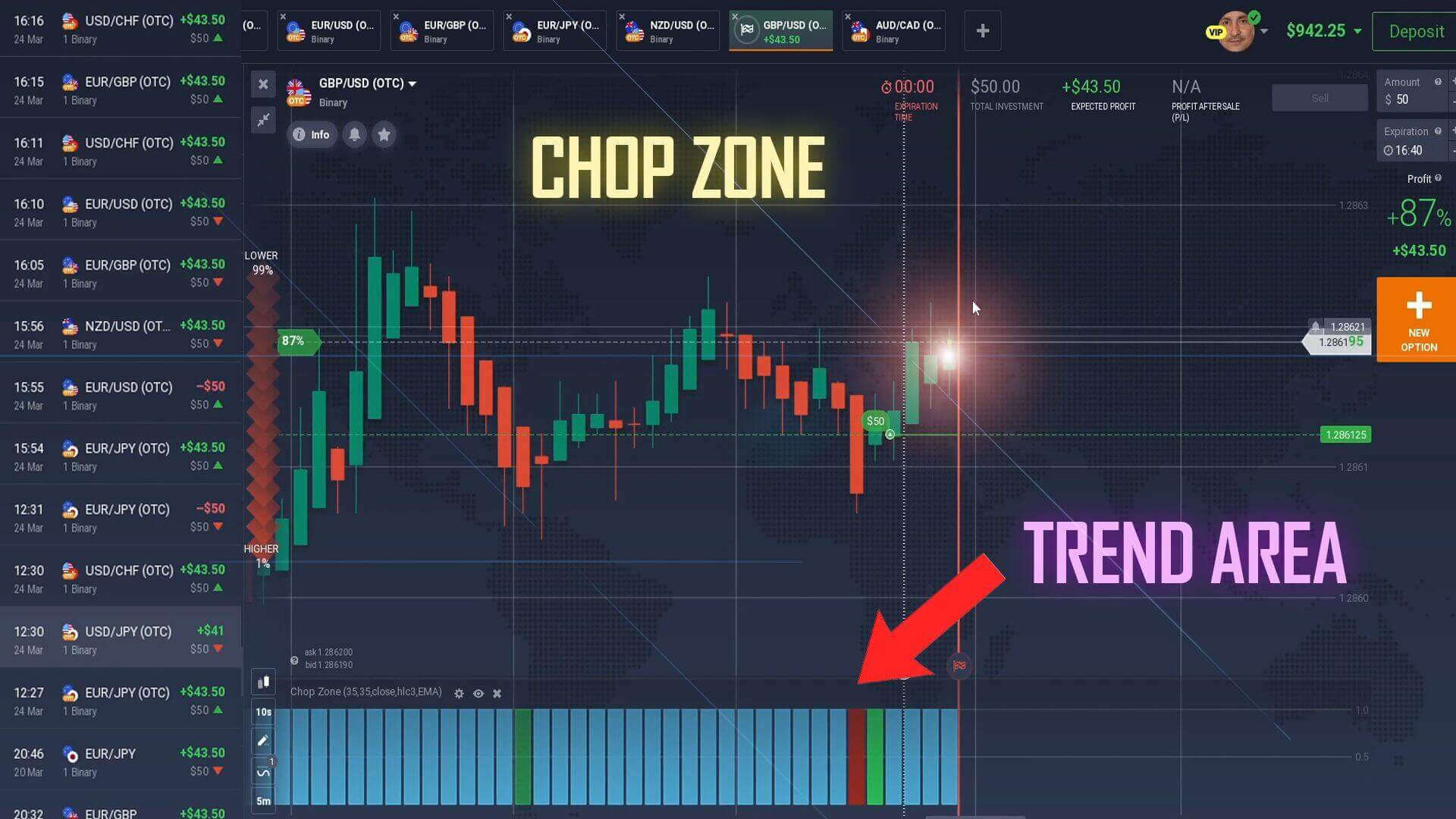
The Chop Zone estimates the "choppiness" of price over a lookback window and colours each bar accordingly, comparing the slope and direction of a moving average against recent price action and painting the result as a colour band. You are not reading exact numbers, you are reading colour, and the colour answers one question: is the market going somewhere, or just drifting?
Reading the Colour Scale
- Cool colours (blues / turquoise): price is choppy and range-bound. There is no reliable trend. Trend-following entries taken here tend to get whipsawed, so this is usually a stand-aside signal.
- Warm colours (reds / oranges / yellows): price is trending with more directional conviction. This is when a matching directional signal is more likely to have momentum behind it.
The exact palette can vary between versions of the indicator, so before you rely on it, watch it on a live chart for a session and learn which colours line up with obvious trending moves and which appear during flat drift. Learn "trend colour versus chop colour" on your own screen.
Why It Needs a Directional Partner
Because the Chop Zone only classifies conditions, it cannot generate entries by itself. You pair it with a directional tool that answers "which way?" while the Chop Zone answers "should I trade at all?". A moving-average cross, a momentum oscillator or a clean candlestick pattern all work as the directional half, and the Chop Zone is the gatekeeper that decides whether that read gets acted on. For a worked example, the IQ Option STARC Bands and Chop Zone method pairs the same filter with a volatility band.
The Setup and Settings
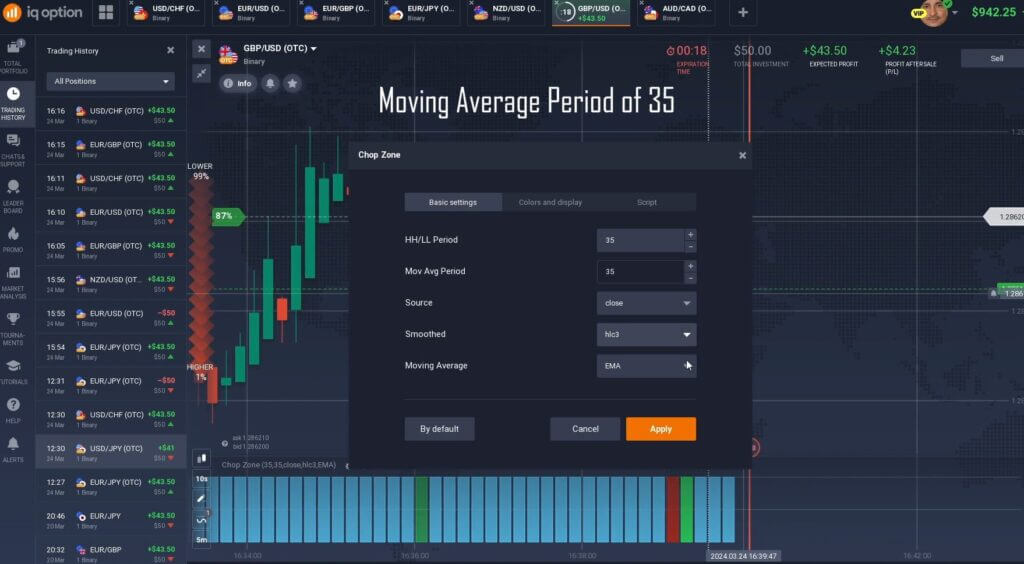
A practical starting configuration on IQ Option uses an HH/LL period of 35 and a moving average period of 35. Some traders read it against a 10-second candle on very short expiries, but slower candles give steadier colour reads and fewer false flips, so treat the fast setting as advanced rather than default. Keep the chart uncluttered so the colour band and your directional tool are easy to read under a short timer.
The entry logic is deliberately simple:
- Trade only in trend colour. When the Chop Zone shows a warm, trending colour and your directional tool signals up, consider a higher/call position; when it signals down, consider a lower/put position.
- Stand aside in chop colour. When the band is a cool, range colour, skip the signal no matter how tempting the arrow looks. Most avoidable losses come from trading a good signal in the wrong conditions.
- Wait for the candle to form. Let the reading settle before you act rather than reacting to a colour still changing mid-candle.
For related reading, see the IQ Option best indicator settings guide and the IQ Option 1 minute strategy.
When the Chop Zone Fails
No filter is flawless. The Chop Zone lags because it is built on a moving average, so it can show trend colour just as a move exhausts, and it can flip late when a range finally breaks. Around major news the colour can whip back and forth. Treat it as one input, not a verdict. That is why risk management does the real work: stake a small, fixed fraction of your balance per position, cap how many trades you take in a session, and stop for the day at a preset loss limit. Practise the colour reads on a demo account until standing aside in chop feels automatic before you commit real funds. The aim is consistency and disciplined decisions, not a perfect entry.
FAQ
Is the Chop Zone a secret indicator that wins on its own?
No. It is a widely available market-condition filter, and it does not produce entries by itself. It only classifies trending versus ranging conditions. You still need a directional tool for the actual up/down decision, and losing trades remain a normal part of short-expiry trading.
What settings should I start with on IQ Option?
An HH/LL period of 35 and a moving average period of 35 is a sensible starting point. Slower candles give calmer, more reliable colour reads than the 10-second setting. Test any configuration on a demo chart before using it live.
Do I need to buy anything to use this?
The concept works with standard charting tools. If you want the packaged indicators and strategies used across this site, they are bundled in a single $39 lifetime plan, but you can learn and practise the Chop Zone method without any purchase first.
This content is for educational purposes only. Trading involves risk. Past results do not guarantee future outcomes. Always practice responsible money management and limit your daily trades to avoid large losses.