IQ Option Winning Trick 2023
“Winning trick” is how this page is titled, so let us be honest about that phrase up front: there is no trick that wins every trade, and anyone who tells you otherwise is selling a story. What the Smart Trade indicator on IQ Option actually does is flag a condition that has already formed on the chart and turn it into an alert. It is a notification, not a prediction of the future. Treat each signal as a prompt to check the setup, not as a green light to click blindly.
What the Smart Trade Indicator Flags
Smart Trade is a short-term signal indicator that watches price movement and prints an alert when momentum looks like it may be turning — typically a potential reversal or entry condition. It is built for fast, short-expiry trading, usually on the 1-minute to 5-minute timeframe, and it marks the moment an overbought or oversold-style condition appears in the price data. The important part is what this means in practice: by the time the alert shows, the move it is describing has already started forming. The indicator is reporting a condition that exists now, not forecasting one that will happen next.
Why It Can Repaint — and How to Handle It
Like most reversal signal tools, Smart Trade can repaint. An alert that appears while a candle is still open can shift or disappear once that candle closes, because the underlying condition changed before the bar finished. That is why the single most useful habit is simple: wait for the candle to close before acting on any alert. Then add a trend filter — a longer moving average, or the direction of a higher timeframe — so you are not taking a reversal signal straight into a strong trend. Reversal signals fail most often in strong trends, because the market keeps pushing one way while the tool keeps calling a turn that has not arrived.
Setup and Settings
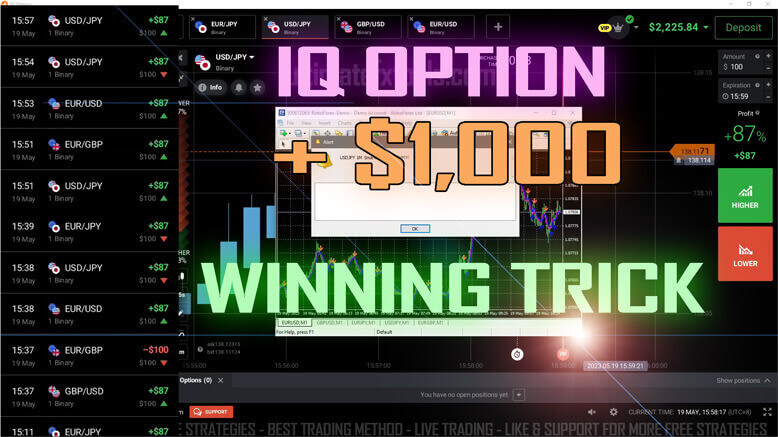
The workflow is to run the indicator in MetaTrader and read its alert against the matching pair on your IQ Option chart. Sensible starting settings:
- Platform: install Smart Trade in MetaTrader 4, then match the pair and time it against the IQ Option candle.
- Timeframe: 1-minute for the fastest reads, 5-minute for calmer, cleaner alerts with less noise.
- Sensitivity: keep the default so alerts fire only on meaningful momentum turns rather than on every small wiggle.
- Trend filter: add one moving average (for example a 50-period) and only take alerts in the direction of that filter, or stand aside when the trend is running hard against the signal.
- Focus: trade a small number of liquid pairs you know well instead of jumping across the whole watchlist.
How to Confirm an Alert
Confirmation is what turns a raw alert into a decision you can trust:
- Let the signalling candle fully close before you do anything.
- Check the trend filter — is the alert with the broader direction, or fighting it?
- Look for simple price confirmation, such as a candle rejecting a level or a recent swing high or low holding.
- If the alert and the filter disagree, skip the trade. Filtering out conflicting alerts is what separates steady decisions from chasing every arrow.
When It Fails
Smart Trade struggles most in three conditions: strong one-directional trends, where it keeps calling a reversal that does not come; flat, low-volatility chop, where alerts fire and reverse; and around news spikes, where price ignores technical structure entirely. No indicator removes losing trades, and this one is no exception. A fixed, small stake per trade, a cap on how many trades you take in a session, and a daily loss limit will protect your account far more than any single alert ever could. Practise the rules on a demo account until the reads feel automatic before risking real funds.
Want to go deeper? See the Smart Trade indicator page, this step-by-step guide on how to use Smart Trade on IQ Option, the IQ Option 1-minute strategy, and a breakdown of IQ Option indicator settings for cleaner charts.
FAQ
Is the “winning trick” real — does Smart Trade win every trade?
No. There is no trick that wins every trade. Smart Trade flags a condition that has already formed and turns it into an alert; it does not predict the future. Losing trades are a normal part of short-expiry trading, and consistency comes from disciplined risk management, not from any single signal.
Does the Smart Trade indicator repaint?
It can. An alert shown while a candle is still open may move or vanish once that candle closes, which is exactly why you confirm on candle close and add a trend filter before acting on it.
Where do I get the Smart Trade indicator?
Smart Trade is included with every other tool on the site under a single $39 lifetime plan — see the pricing page. Install it in MetaTrader 4 and read its alerts against your IQ Option chart.
This content is for educational purposes only. Trading involves risk. Past results do not guarantee future outcomes. Always practice responsible money management and limit your daily trades to avoid large losses.