Olymp Trade Mobile Free Strategy
A free Olymp Trade mobile strategy using the app's built-in Bollinger Bands and EMAs - settings, entry rules, and when it fails.
Before anything else, one thing has to be clear. Custom MT4/MT5 indicators do not run inside the Olymp Trade mobile app. Those .ex4/.ex5 files only load in MetaTrader on a desktop. A genuine mobile strategy therefore relies on the indicators built directly into the Olymp Trade app itself — and the app already includes the core tools you need, free to add in a few taps.
What the Built-In Indicators Measure
This mobile setup uses two built-in tools that complement each other:
- Bollinger Bands measure volatility. They plot an upper and lower band a set number of standard deviations away from a moving-average midline. When price stretches toward the outer band, it is trading far from its recent average — a stretched, potentially over-extended condition worth watching.
- EMAs (Exponential Moving Averages) measure the short-term trend by smoothing recent prices, weighting the newest candles more heavily. Reading two EMAs together shows whether momentum is leaning up or down and how strong that lean is.
Neither tool predicts the future. Bollinger Bands tell you how far price has travelled; the EMAs tell you which way it is currently leaning. Used together they help you read context instead of guessing.
The Mobile Setup (Free, Built-In)
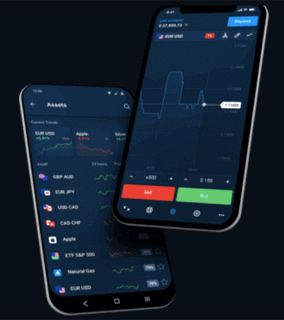
Open a chart in the Olymp Trade app, tap the indicator icon, and add each tool from the app's own list:
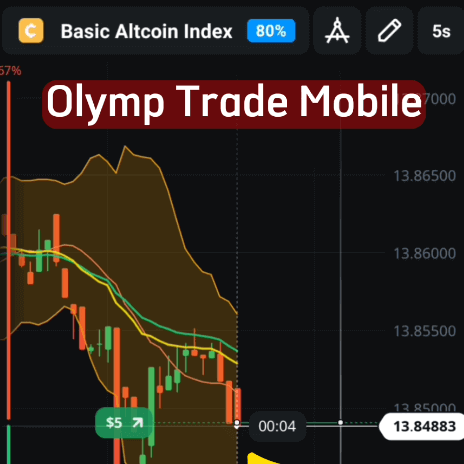
- Bollinger Bands — period 13, deviation 2.5. A slightly wider deviation keeps the bands from reacting to every minor wiggle, so a touch of the outer band means more.
- EMA — add two: one at period 22 and one at period 30. The gap and slope between them show momentum direction at a glance.
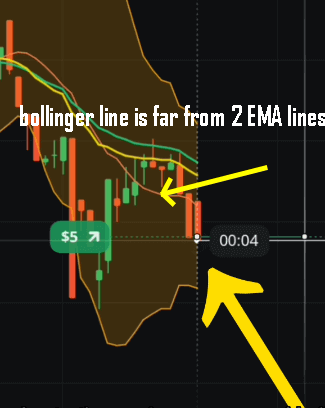
The general idea from the original chart still holds: pay attention when price and the Bollinger band pull well away from the two EMAs, because that separation marks a stretched market where a short-term reaction is more likely. Let each candle close before you read the picture, and keep the chart uncluttered so the bands and EMAs stay easy to interpret on a small screen.
Entry Logic
Keep the rules simple enough to apply calmly inside a short expiry:
- Possible up trade: price is near or below the lower Bollinger band while the EMAs are flattening or turning up, suggesting the down-move is losing steam.
- Possible down trade: price is near or above the upper band while the EMAs are flattening or turning down.
- Stand aside: price sits in the middle of the bands with the EMAs tangled together and no clear lean. A flat, directionless chart is the easiest way to lose on a fixed expiry, so waiting is a valid decision.
When This Setup Fails
Bollinger Bands and EMAs are lagging tools, so they struggle in two situations. In a strong trend, price can "walk the band" — hugging the outer band candle after candle — and fading it repeatedly is a fast way to rack up losses. In a dead, flat market, the bands squeeze together and produce weak, whipsaw signals. Recognising these conditions and not trading them matters more than any single entry. No indicator removes losing trades; the aim is steady, repeatable decisions and consistency over time.
Risk Management
Risk control is what keeps you in the game. Stake a small, fixed fraction of your balance per trade, cap how many trades you take in a session, and stop for the day once you hit a preset loss limit. Never increase your stake to "win back" a loss — chasing losses with bigger positions is how accounts get wiped out. Practise the whole routine on a demo account until the reads feel automatic before you risk real money.
FAQ
Can I use custom MT4/MT5 indicators in the Olymp Trade mobile app?
No. Custom .ex4/.ex5 indicators only load in MetaTrader on desktop. On mobile you build the strategy from the indicators already included in the Olymp Trade app, such as Bollinger Bands and EMAs.
Is this mobile strategy really free?
Yes. Both the Bollinger Bands and the EMAs are built into the Olymp Trade app at no cost. If you later want our full library of MetaTrader indicators for desktop trading, those are covered by a single $39 lifetime plan.
What timeframe and expiry should I use?
A one-minute chart with a one-minute expiry is a common starting point, and many traders also read the 2m, 3m or 5m. In choppy conditions a slightly longer reading helps filter weak signals. Match the expiry to the timeframe you actually read the signal on, and confirm the approach on demo first.
Want to go deeper? Compare this with the Olymp Trade 1 minute strategy, the faster Olymp Trade Quickler 5 second strategy, and our breakdown of the Bollinger MA indicator.
This content is for educational purposes only. Trading involves risk. Past results do not guarantee future outcomes. Always practice responsible money management and limit your daily trades to avoid large losses.