Strategy Overview
This is a free two-indicator method designed for 30-second trading on Pocket Option. Both the Rate of Change (ROC) and Parabolic SAR are available at no cost directly inside the platform — no downloads, no purchases required.
The logic is straightforward: the Rate of Change tells you which direction momentum is leaning, while the Parabolic SAR confirms whether the trend has actually shifted. When both agree, you have a cleaner reason to enter. Used consistently with disciplined money management, this combination has shown a high signal-accuracy rate across sample sessions — though as with any short-term method, outcomes vary per session and per asset, and no single trade is guaranteed.
Prefer to have this read the chart for you? The ROC + SAR Alert indicator for MT4 & MT5 prints the buy/sell arrows automatically and sends a popup, sound, mobile, or email alert the moment both conditions line up.
Chart Setup
-
Open a Pocket Option chart:
- Use standard Japanese candlesticks. This strategy works on most Forex and OTC pairs — choose assets with a high return rate to maximize the value of your winning trades.
-
Add the Rate of Change (ROC) indicator:
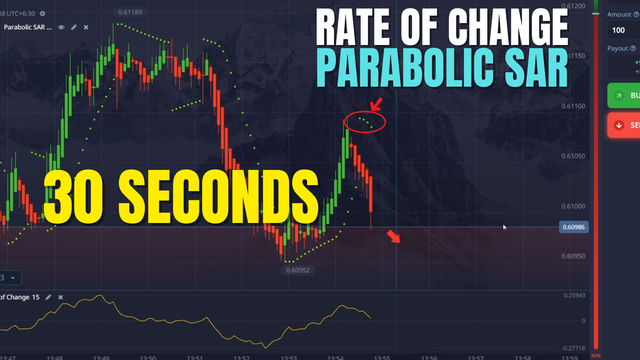
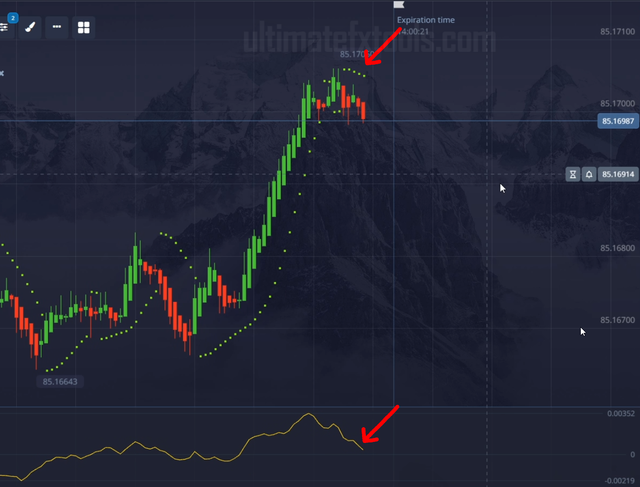
- The Rate of Change measures the percentage price change over a set lookback period. Keep the default settings as shown in the video. The key level to watch is zero — the line crossing above zero signals upward momentum, and crossing below zero signals downward momentum.
-
Add the Parabolic SAR indicator:
- The Parabolic SAR appears as dots above or below each candle. Use the default settings. Dots below price mean the trend is currently up; dots above price mean the trend is currently down. A flip from above to below (or below to above) is the trigger you are watching for.
Chart in Action
Entry Rules
CALL (Higher) Entry
- The Parabolic SAR dots flip from above price to below price — signaling that the trend has shifted upward.
- The Rate of Change line is above zero, or is crossing up through zero at the same time — confirming upward momentum.
- When both conditions are in place, open a CALL trade with a 30-second expiry.
PUT (Lower) Entry
- The Parabolic SAR dots flip from below price to above price — signaling that the trend has shifted downward.
- The Rate of Change line is below zero, or is crossing down through zero at the same time — confirming downward momentum.
- When both conditions are in place, open a PUT trade with a 30-second expiry.
Tips for Better Results
- Wait for both indicators to agree. Do not enter when the Parabolic SAR has flipped but the ROC is still on the wrong side of zero, or vice versa. Patience here is the filter that keeps you out of weak setups.
- Pick high-return assets. On Pocket Option, sort your assets by return rate and prioritize those offering the highest payout percentages — this gives your accurate trades more value and covers the occasional loss more effectively.
- Limit your daily trade count. Short-term trading can feel fast-paced, but overtrading is one of the most common ways to give back gains. Set a maximum number of trades per session and stick to it.
- Use consistent position sizing. Avoid increasing your trade size after a loss. Flat, consistent sizing keeps your account stable and lets the strategy play out over a proper sample of trades.
Watch the Full Strategy Video
See the Rate of Change + Parabolic SAR setup explained live — indicator configuration, exact entry conditions, and 30-second trades on Pocket Option in real time.
Risk Disclaimer
This content is for educational purposes only. Trading involves significant risk. Past results do not guarantee future outcomes. Always practice responsible money management and only trade with capital you can afford to lose.
#PocketOption #RateOfChange #ParabolicSAR #30SecondStrategy #FreeIndicators #BinaryOptions #OTCTrading #TradingStrategy #TechnicalAnalysis #TradingEducation