
Quotex AI Signals: How PipGems Helps You Trade 1-Minute Setups
PipGems is UltimateFXTools' own AI-powered signal app. It runs a live signal feed and a smart screener that watch major forex pairs and flag short-term setups worth a closer look. It is important to be clear about what that means: PipGems does not predict the outcome of a trade, it has no win rate, and it cannot tell you a 1-minute candle will finish green or red. When the title says it "improves" your trading, it means the app helps you stay selective and filter noise, so you act on a handful of considered setups instead of clicking on every impulse. On a fast platform like Quotex, that discipline is the real edge.
What PipGems Actually Does
The app scans price action across a shortlist of liquid currency pairs and posts an alert when its logic detects a candidate setup. Each alert is a prompt to look at the chart, not an instruction to trade. The screener lets you narrow the feed to the pairs you follow, and audible pop notifications mean you do not have to stare at the screen waiting. Think of PipGems as a research assistant that surfaces moments for your attention. The judgment about whether to enter, skip, or wait still belongs to you.
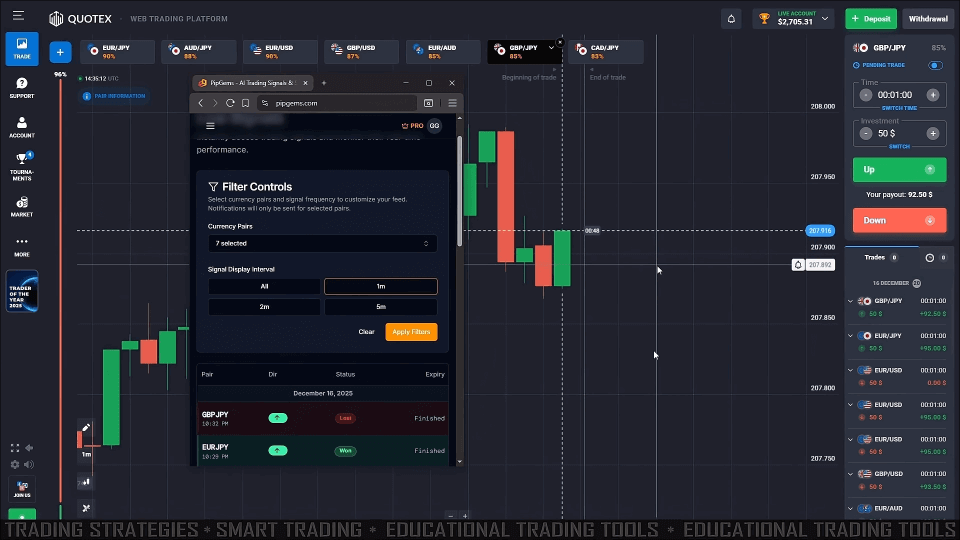
Using PipGems on Quotex 1-Minute Trades
Because PipGems and Quotex are separate windows, the workflow is to read the alert in the app and confirm it on the Quotex chart before doing anything. A simple, repeatable routine works best:
- Set up your workspace: resize your browser so PipGems and the Quotex chart sit side by side, and enable sound so you catch alerts as they post.
- Match the pair: filter the Quotex chart to the same currency pair the alert names, and keep to a short list of pairs you actually know.
- Confirm before you act: when an alert fires, check that the current Quotex candle agrees with it — direction of the last few candles, a nearby support or resistance level, and whether price is trending or stuck flat. If the chart does not back up the alert, skip it.
- Mind the clock: alerts can arrive with a short delay, and even a few seconds matters on a 1-minute expiry. If a setup has already moved by the time you look, let it go rather than chasing it.
How to Confirm a Signal
Confirmation is what separates disciplined use from gambling on every pop. Before entering, ask three quick questions: does the recent candle structure agree with the alert's direction, is price reacting at a level that makes sense, and is the market currently trending rather than chopping sideways? When all three line up, the setup is cleaner. When they conflict, the honest answer is to stand aside. Filtering out the setups that do not confirm is the single biggest factor in trading with more consistency, and it is exactly where an AI screener earns its place — by giving you fewer, clearer things to evaluate.
Know the Limits
No signal app removes losing trades, and PipGems is no exception. It has no accuracy figure to quote because it is a filtering and alerting tool, not a crystal ball. Short expiries are unforgiving, so risk control is what keeps you in the game: stake a small, fixed fraction of your balance per trade, cap how many trades you take in a session, and stop for the day once you hit a preset loss limit. Practice the whole routine on a Quotex demo account until your reads and your execution speed feel automatic before you risk real funds. For a deeper walkthrough of the app's screener, see our guide to Quotex PipGems smart signal trading, and if you are new to the platform, the Quotex easy strategy is a gentle starting point.
FAQ
Does PipGems guarantee winning trades on Quotex?
No. PipGems is an AI-powered signal app that flags candidate setups; it does not predict outcomes and has no win rate. Losing trades are a normal part of short-expiry trading. Confirming each alert on the chart and managing your risk is what makes the difference over time, not any single signal.
How do I get access to PipGems?
PipGems is part of the UltimateFXTools ecosystem. The $39 lifetime membership includes a free PipGems bonus period so you can try the live feed and screener alongside the rest of the tools. Start on a demo account first to learn the workflow before committing real money.
What timeframe and settings work best?
The app is built around 1-minute alerts, so a 1-minute Quotex chart with a 1-minute expiry is the natural match. Keep sound enabled, focus on a small shortlist of liquid pairs, and avoid spreading yourself across too many instruments at once. In choppy conditions, waiting for the next clean setup is better than forcing a trade.
This content is for educational purposes only. Trading involves risk. Past results do not guarantee future outcomes. Always practice responsible money management and limit your daily trades to avoid large losses.


