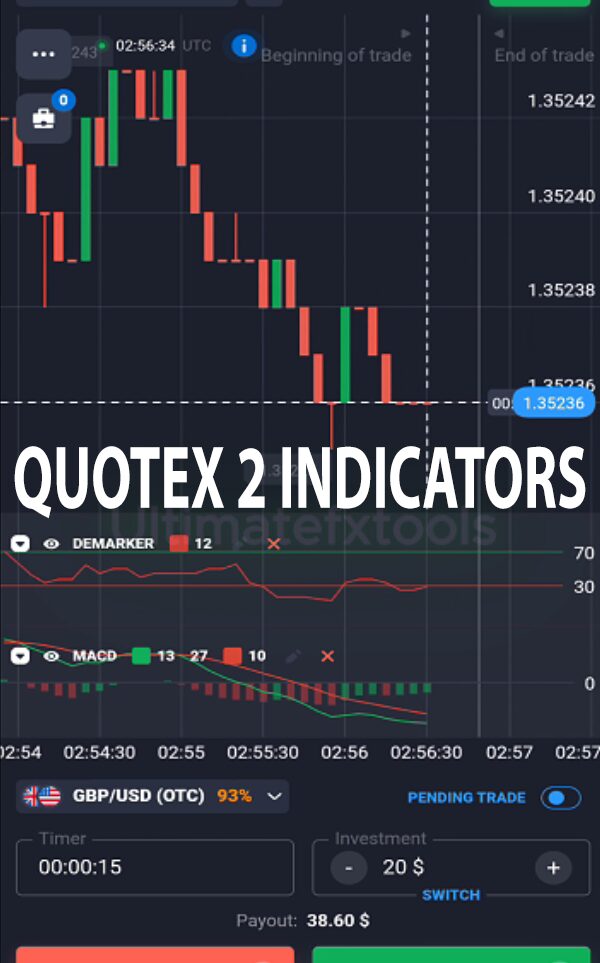
Master 15 Second Trades on Quotex Mobile
Trading on Quotex from your phone works best when you keep the chart simple. This guide walks through a two-indicator mobile strategy built entirely from the app's built-in indicators: DeMarker and MACD. Both are already inside the Quotex mobile app, so there is nothing to install and nothing to import.
One point to be clear about up front: custom MetaTrader indicators (.ex4 / .ex5 files) do not run inside the Quotex mobile app. The app only supports the indicators it ships with. Any workable phone strategy therefore has to be assembled from those built-in tools, which is exactly what DeMarker and MACD give you.
The Two Built-In Indicators
Each indicator does a different job, and understanding that job matters more than the exact numbers on the settings screen.
- DeMarker is an oscillator that measures whether recent price has stretched into overbought or oversold territory. It hints at when a move may be losing steam.
- MACD tracks momentum by comparing two moving averages, with a signal line that can cross to mark a shift in direction.
A fair note on "confirmation": both indicators are derived from the same price series and both react to momentum, so they are partly correlated. When they agree it is a stronger read of the current move, but it is not two fully independent votes. Treat their agreement as one clearer signal, not as a guarantee.
Chart Setup on the App
Open the Quotex mobile app, tap the indicators icon, and add DeMarker and MACD from the list. A starting point many traders use:
- Chart type: candlesticks, on a short timeframe such as 5 seconds for fast expiries or 1 minute if you prefer a slower pace.
- Trade expiry: match it to the timeframe you are reading. Very short 15-second expiries move quickly and leave little room for error, so many people practise on a 1-minute chart first.
- DeMarker: period around 12–14.
- MACD: a common setup is fast 13, slow 27, signal 10. Adjust to the asset you trade rather than treating any figure as fixed.
Reading the Entry Signals
The idea is to look for a possible reversal where both tools point the same way:
- Possible DOWN (PUT) setup: DeMarker is stretched into the overbought zone (near or above 0.70) and the MACD lines look ready to cross downward. A clear reversal candle can add context.
- Possible UP (CALL) setup: DeMarker is in the oversold zone (near or below 0.30) and the MACD lines look ready to cross upward, ideally with a supportive candle.
Waiting for both conditions filters out some noise, but it does not remove risk. Reversal signals fail in strong trends, and in a fast market the price can move against you before an expiry closes. If you want a slower alternative to compare against, see our Quotex easy strategy or the Quotex 1 minute strategy.
Realistic Expectations
No indicator combination predicts the market. DeMarker and MACD describe what price has already done; they cannot know what comes next. Some setups will work and some will not, and short-expiry binary trades are especially sensitive to timing and spread. Track your results on a demo account before risking real money, and judge the method over many trades rather than one or two.
Risk Management
Because these trades are fast and all-or-nothing, position sizing is where you protect yourself:
- Risk only a small, fixed percentage of your balance per trade so a losing streak cannot wipe you out.
- Set a daily loss limit and stop for the day once you hit it.
- Avoid martingale. Doubling stakes after a loss can blow up an account very quickly and is not a recovery plan.
- Trade only money you can afford to lose, and keep a written log so you can review what is actually working.
Frequently Asked Questions
Does this strategy win every trade?
No. No strategy wins every trade. DeMarker and MACD only improve the context around an entry; losing trades are a normal part of the process, which is why disciplined risk management matters more than any single signal.
Can I use custom MT4/MT5 indicators in the Quotex mobile app?
No. The Quotex mobile app cannot load external .ex4 or .ex5 files. You are limited to the built-in indicators such as DeMarker and MACD. Custom MetaTrader indicators only run inside MetaTrader itself on a compatible platform.
Which timeframe is best for beginners?
Slower is easier to read. Starting on a 1-minute chart with a matching expiry gives you more time to confirm a signal than a 15-second setup, which suits practice while you learn how the two indicators behave together.
Want more ready-made setups? Our full library of indicators and strategies is available for a one-time $39 lifetime purchase, including MT4/MT5 tools for desktop trading.
This content is for educational purposes only and is not financial advice. Trading involves substantial risk; you can lose some or all of your capital. No result is guaranteed and past performance does not indicate future results. Trade only what you can afford to lose.


