I Used AI to Build a Pocket Option Strategy —
3 of 4 Trades This Session (2026)
👤 ultimatefxtools
📅
⏱️ 7 min read
🤖 PipGems AI + Pocket Option
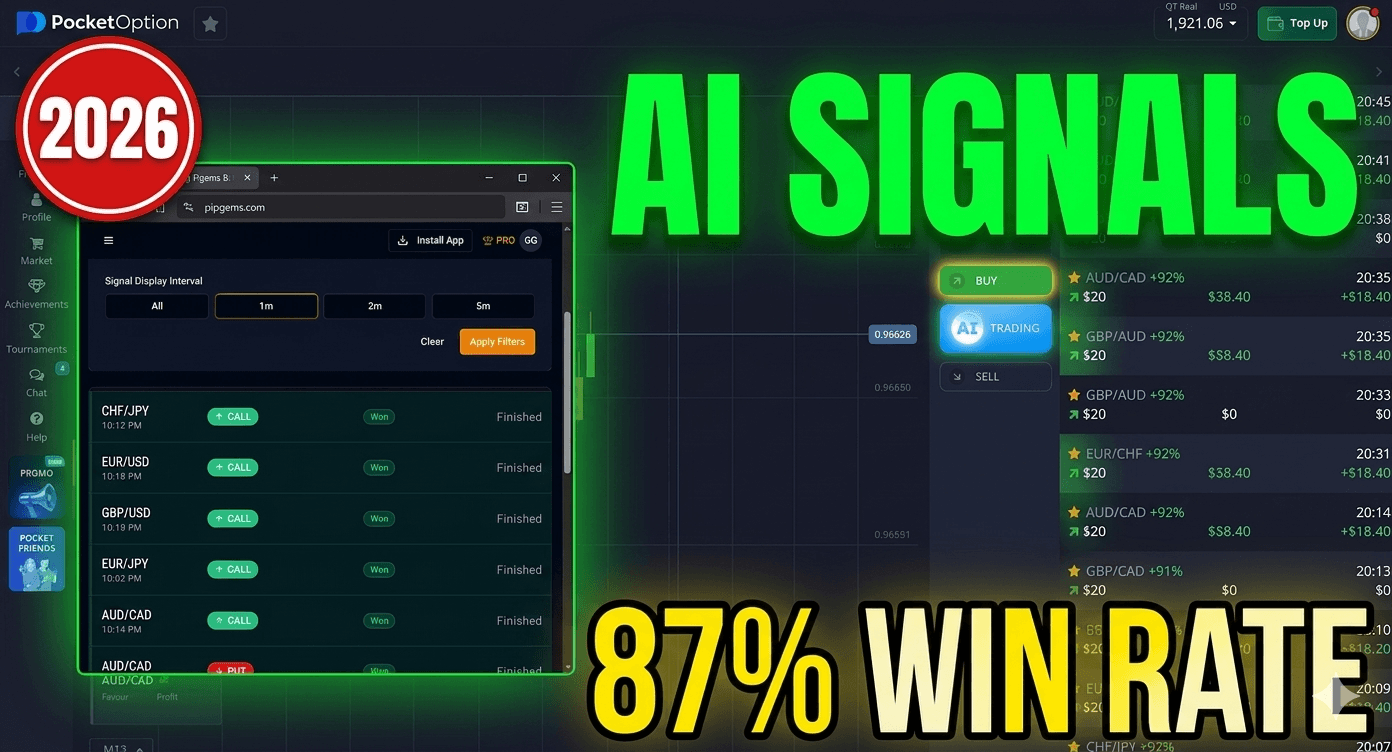 PipGems AI Signals + Pocket Option — Live 1-Minute Trading Session with Real Trade Results
✨ Quick Summary
PipGems AI Signals + Pocket Option — Live 1-Minute Trading Session with Real Trade Results
✨ Quick Summary
What Is This Strategy?
This is a complete live trading session using PipGems AI signals filtered for 1-minute entries on good return non-OTC currency pairs on Pocket Option.on covers 4 trades across AUD/CAD, CHF/JPY, AUD/USD, and GBP/CHF — including a real Martingale recovery that turned a loss into winnings.
AI-Powered Signals 1-Minute Entries Non-OTC Pairs Only Martingale Recovery 3 of 4 Trades This Session Live ProofWhat happens when you combine AI-generated trading signals with a disciplined pair filtering system and a proven recovery method on Pocket Option? In this live session, I used PipGems AI signals to guide every entry — filtering specifically for 1-minute alerts on good return non-OTC currency pairs — and the results speak for themselves.
This guide walks you through every single trade from start to finish: the setup, the signal, the entry, the result, and the key lesson from each one. Whether you're a beginner or an experienced trader, this workflow will give you a clear, repeatable framework to follow.
4Total Trades 3+Winning Trades 1mSignal Interval 3 of 4Trades This SessionThe Setup — How PipGems Works With Pocket Option
Before placing a single trade, the setup is everything. PipGems continuously scans the market in real time and generates call and put alerts based on the 1-minute interval filter. But not every signal is worth acting on — the key is matching your signal feed to the pairs actually available on your Pocket Option platform.
Why Non-OTC Pairs Are Critical ✓ Non-OTC pairs sync with real-time market price data — the same data PipGems reads to generate its signals ✓ OTC pairs use simulated pricing — which can cause signal misalignment and inaccurate entries ✓ High payout pairs ensure your winning trades actually generate meaningful returns worth the risk ✓ Filtering eliminates noise — you only see signals for pairs that are live and tradeable on your platform right now 1 Open PipGems Live Signals PanelSet the interval filter to 1 minute and open the live signals feed. You'll start receiving call and put alerts immediately.
Head to your Pocket Option asset list and identify which non-OTC currency pairs are available with a high payout percentage right now.
3 Filter PipGems to Match Your Available PairsOpen the currency pairs dropdown in PipGems filter controls and select only the pairs from your Pocket Option list. In this session, 8 pairs were selected.
4 Execute the Moment the Signal AppearsEvery second of delay can be the difference between a valid signal and an expired one. Execute immediately — no hesitation.
🤖Key Insight on Signal Timing
There is sometimes a slight delay between when PipGems generates a signal and when it gets delivered to your screen. The best practice is to execute your trade the moment the signal appears. Do not wait. Because every second of delay can be the difference between the signal being valid or already expired.
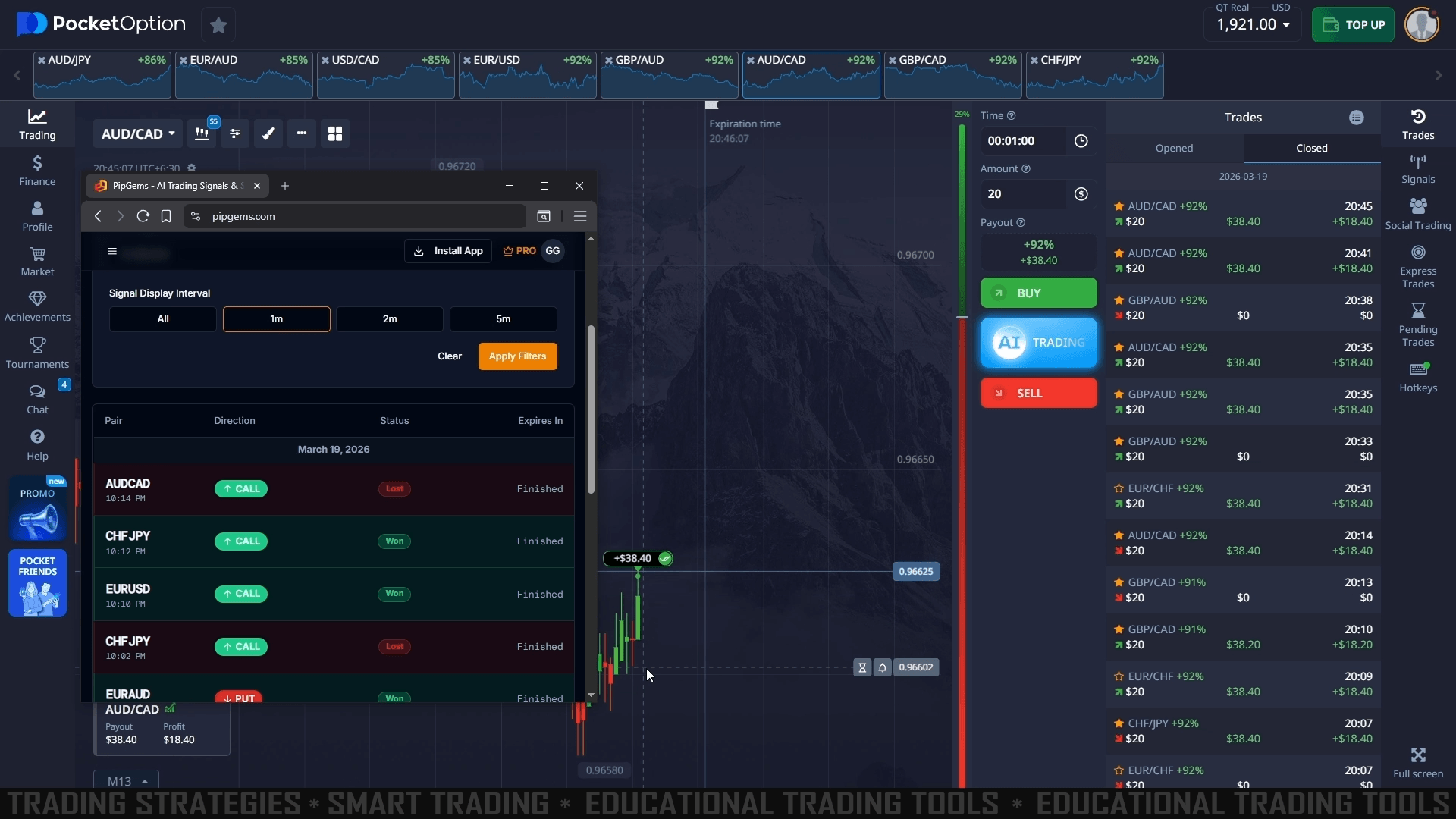 PipGems AI Signal Filter Setup — Matching good return non-OTC pairs with the live signal feed for Pocket Option
Live Trade Breakdown — Every Trade From This Session
Here is a complete breakdown of all 4 trades placed during this live session, with the signal, price action reading, and final result for each one.
AUD/CAD 📈 CALL ✅ WIN +$38.40 win CHF/JPY 📈 CALL ✅ WIN $20 trade AUD/USD 📈 CALL ✅ WIN $20 trade GBP/CHF 📉 PUT 🔄 RECOVERED Martingale ×3Trade 1 — AUD/CAD Call Signal ✅
PipGems generated a call alert on AUD/CAD while the chart showed a strong extended downtrend — a classic reversal setup. The trade was executed immediately and closed as a winner, paying $38.40. The key lesson here: AUD/CAD was briefly showing as a loss on the PipGems feed due to a minor data delay, but on the Pocket Option trades panel it was confirmed as a winner. This is why you always verify results on your broker platform.
Trade 2 — CHF/JPY Call Signal ✅
A new call alert fired on CHF/JPY. The chart showed a significant downtrend with bullish momentum beginning to form at the bottom. A $20 buy trade was placed with a 1-minute expiration. CHF/JPY closed as a confirmed win on both PipGems and Pocket Option simultaneously — a perfectly aligned signal execution, exactly the kind of clean result this strategy is designed to produce.
Trade 3 — AUD/USD Call Signal ✅
AUD/USD triggered a call signal with price showing a potential reversal forming at the bottom of a downward move. Even on an uncertain setup, trusting the AI signal and executing quickly delivered a winning result. This trade reinforces one of the core principles of this strategy: trust the signal, execute fast, let the AI do the analysis.
💡Why AUD/USD Was Uncertain — and Won Anyway
The AUD/USD setup had a choppy chart at the time of entry. Normally, uncertainty makes traders hesitate or skip the trade. But because PipGems had already analyzed the probability and issued a signal, executing quickly still produced a win. This is the value of AI signal filtering over manual analysis.
Trade 4 — GBP/CHF Put Signal + Martingale Recovery 🔄
GBP/CHF issued a put signal during a significant upward spike. Instead of reversing, the price doubled down on the uptrend and continued pushing higher — meaning the initial $20 trade was in a very difficult position. This is where the Martingale recovery method was applied.
⚠️Why This Session Used Martingale — and Why You Should Not Copy It
This walkthrough shows a Martingale recovery because that is what happened in the session, not because it is a technique to rely on. There is no market condition that makes doubling your stake after a loss safe: each trade is independent, so a prior loss tells you nothing about the next outcome, and scaling up "across 3+ recovery trades" simply means the largest stake lands exactly when you are already down. The honest choice is a flat stake on every trade — win or lose — and accepting the occasional loss rather than trying to double your way out of it.
What Is the Martingale Recovery Method?
The Martingale method is a position-scaling recovery strategy where you increase your trade size after a loss to recover previous losses and return to winnings when the next trade wins. This is dangerous, not clever: each binary trade is independent, so raising your stake after a loss does not improve the odds of the next one — and a single losing run empties the account fast. Here's exactly how it played out on GBP/CHF:
Warning: doubling your stake after a loss is the single fastest way to blow a trading account. It looks like it always recovers — right up until the one losing streak that runs past your balance or the platform's maximum stake, and then a single sequence takes everything you have staked. A flat stake on every trade, and accepting the occasional loss, is the honest choice.
| Trade # | Size | Direction | Result | Running P&L |
|---|---|---|---|---|
| Trade 1 | $20 | PUT | ❌ LOSS | -$20 |
| Recovery 1 | Scaled up | PUT | ✅ WIN | Recovering... |
| Recovery 2 | Scaled up | PUT | ✅ WIN | Recovering... |
| Recovery 3 | Scaled up | PUT | ✅ WIN | ✅ IN WINNINGS |
Final Result: Loss Recovered, Session Ended in a Win
The first GBP/CHF trade was a loss — but the next three recovery trades all closed in the green, so the initial loss was recovered and this session ended in overall win. Be clear about what that shows, though: it is one sequence that happened to recover, not proof that Martingale works. The winning trades simply landed before the losing streak ran past the balance — the time they don't, the same doubling wipes the account out.
The 3 Core Rules of This Strategy
✅ Always Do This ✓ Filter PipGems to good return NON-OTC pairs only ✓ Execute the moment the signal appears — zero delay ✓ Keep a flat stake on every trade — never scale up after a loss ✓ Verify results on your Pocket Option trades panel — not just PipGems 🚫 Never Do This ✗ Trade OTC pairs — signals will not align with real price data ✗ Wait or hesitate after a signal — delay = expired entry ✗ Apply Martingale on every losing trade without signal confirmation ✗ Trade more than you can afford to lose on any single tradeKey Takeaways From This Live Session
🏆 Session Summary & Key Lessons 1 Always filter PipGems signals to match good return non-OTC pairs available on your Pocket Option platform — this is the foundation of the entire setup 2 Execute your trades the moment the signal appears — signal timing is the single biggest factor separating winning and losing entries 3 Doubling your stake after a loss is the fastest way to blow an account — this session recovered, but the time a losing run outlasts your balance, the same doubling takes everything; a flat stake and accepting the occasional loss is the honest choice 4 PipGems auto-scans the market continuously — signals will appear automatically for your filtered pairs based on the 1-minute interval, so stay ready at all times during your sessionWatch the Full Live Trading Video
Want to see every trade placed in real time with live charts, exact signal entries, and the full Martingale recovery sequence? Watch the complete video breakdown on YouTube.
Frequently Asked Questions
Can beginners use this strategy?
Yes. The strategy is designed to be simple to follow. As long as you set up your pair filters correctly in PipGems and execute signals the moment they appear, beginners can apply this method effectively. Start with demo trading before going live with real capital.
Do I need to use Martingale every time?
No — and it is not a safe recovery tool either. Scaling up after a loss does not change the odds of the next trade, so the honest default is a flat stake on every trade and accepting the occasional loss rather than trying to double your way out of it. Using Martingale on any loss dramatically increases risk and can wipe out an account quickly.
Why only non-OTC pairs?
Non-OTC pairs reflect real-time live market pricing — the same data PipGems reads to generate its AI signals. OTC pairs use simulated pricing that doesn't match real market movement, which causes signal misalignment and leads to inaccurate entries. Always use non-OTC pairs for this strategy.
What pairs work best with this strategy?
In this session, AUD/CAD, CHF/JPY, AUD/USD, and GBP/CHF were used. The best pairs are whichever good return non-OTC currency pairs are currently available on your Pocket Option platform. Check your asset list before each session and update your PipGems filter accordingly.
#PocketOption #PipGems #AISignals #MartingaleStrategy #1MinuteStrategy #LiveTrading #ForexSignals #TradingStrategy2026 #PocketOption2026 #UltimateFXtools #AITrading IQ Option
 + PipGems AI Signals 2026
IQ Option
IQ Option + PipGems AI Signals 2026
 MT4 Indicator
FX Scanner Pro
MT4 Indicator
FX Scanner Pro